An Old Tool, Made to Work Again
Most people programming an STC89/90-series chip today reach for the official STC-ISP GUI application — the big Windows program with the model dropdown, the baud-rate slider, and the "Download/Program" button. It works, but it's also a whole separate application you have to alt-tab into every time you want to push new firmware, and it was never built with a scripted or editor-integrated workflow in mind.
stcisp is the quieter alternative: a native command-line ISP programmer, built from the older open-source stc-isp-win source package rather than the modern GUI lineage. It's a smaller, less-discussed tool — most STC tutorials never mention it — but it does exactly one job, does it from a terminal, and asks nothing of you beyond a serial port, a baud rate, and a hex file.
Why It Needed a Rebuild
The catch with tools this old is that "still compiles" and "still works" are two different claims. The serial layer in stc-isp-win sits directly on the Win32 Communications API, and the console behavior it was originally written against has drifted somewhat from how Windows 10/11's terminal actually behaves today — enough that, unrebuilt, the UART probing sequence could misbehave or hang in a modern cmd.exe session. The version discussed here has been recompiled from source with a current MinGW-w64 / GCC 13.2 toolchain, which resolves that: same protocol, same command-line surface, but console I/O that behaves correctly under a modern Windows terminal. No Python runtime, no extra DLLs, no legacy compatibility shims — it's a small, self-contained executable that does one job.
stcisp from inside Geany means you never have to open the official STC-ISP GUI tool at all. Because it's a plain console executable rather than a windowed application, it drops straight into a Build/Execute command the same way any other command-line tool does — Geany calls it, it runs, it prints its progress in the Compiler panel, and control returns to the editor when it's done. The heavier GUI programmer has its place for one-off exploratory work, but for an everyday edit-compile-flash loop, the CLI tool integrates far more cleanly and removes an entire application from the cycle.Command-Line Usage
stcisp -s COM3 -b 2400 -f LedBlink.hex
| Option | Meaning | Typical value |
|---|---|---|
-s | Serial port | COM3 (or 1, 2, ...) |
-b | Initial baud rate | 2400 (most reliable) |
-f | Firmware image | .hex / .ihx / .bin |
2400 baud is the classic STC handshake speed. Faster rates are supported once contact is established, but starting slow is what makes first contact reliable across the wide range of USB-to-TTL adapters people actually have on hand.
The Handshake, in Detail
Unlike an SPI/ISP programmer that simply asserts control and goes, stcisp has to talk its way past a bootloader that only listens for an instant after reset. The moment you launch it, it starts sending a continuous stream of probe bytes:
TX: 7F
TX: 7F
TX: 7F
...
That stream is not a hang — it's stcisp patiently knocking. The STC bootloader only runs for a short window right after power-up, so this is the point where you power-cycle (or press reset on) the board. As soon as the chip catches the probe mid-boot, it stays in ISP mode and responds, and you'll see the exchange move forward:
Start Programming >>>
target is full gain
target is normal speed(12T)
target's P1.1&P1.0 normal
...
Program OK
Program OK is your confirmation the flash write completed and the new firmware is live.
Wiring It Up
If you're not using a board with an onboard USB-serial chip, a plain USB-to-TTL adapter wires up as follows:
| Adapter / PC | MCU pin |
|---|---|
| TXD | RXD (P3.0) |
| RXD | TXD (P3.1) |
| GND | GND |
| 5V (optional) | Vcc |
The Everyday Loop
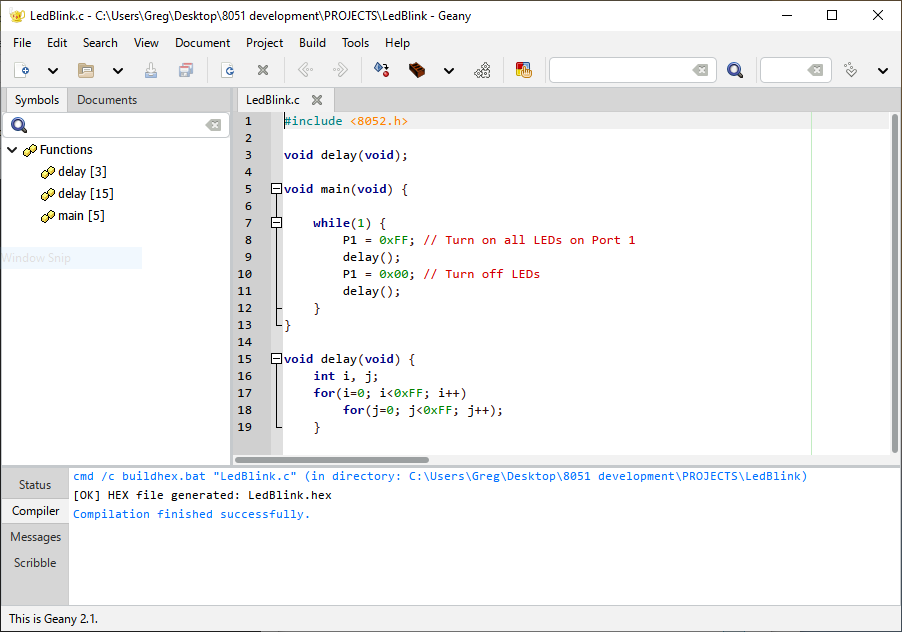
Once sdcc and stcisp are both reachable — on the PATH, or sitting next to your batch scripts — the whole cycle collapses to two commands and one physical gesture:
:: Compile
buildhex.bat LedBlink.c

:: Program (then power-cycle when TX: 7F appears)
program_hex.bat LedBlink.hex
Wired the same way into Geany's Build and Execute buttons, that becomes F9 to compile, then Execute to flash — no separate application ever opens, and the terminal output showing the probe stream and the eventual Program OK lands right in Geany's own Compiler panel.
Scope and Limits
stcisp speaks the older STC89/90-family protocol specifically. Newer STC families — the STC15 and STC8 lines — use a different bootloader protocol and generally need a different tool, such as stcgal. For the classic parts that show up in most hobby and teaching boards, though, stcisp is complete on its own: no companion runtime, no configuration files, just a compiler output and a serial port.
Full Reference
The companion write-up covers prerequisites, the full buildhex.bat / program_hex.bat scripts, a troubleshooting table for the handful of failure modes you're likely to actually hit, and a one-page quick-reference card.