jABEL — ABEL Equations In, a GAL You Can Trust Out
There is still a lot to like about the humble GAL. A GAL16V8, GAL20V8 or GAL22V10 costs very little, comes in a through-hole DIP that drops straight onto a breadboard, runs at 5 V, wakes up instantly, and replaces a handful of 74-series gates, decoders and counters with one chip. The parts are still made and stocked. What has quietly disappeared is the software: the classic ABEL compilers were DOS tools, then part of vendor suites that dropped these devices years ago.
jABEL is my answer to that. It is a small, self-contained Java program that reads
ABEL-HDL — equations, sets, WHEN/THEN/ELSE, state diagrams, truth tables and test
vectors — and writes the JEDEC fuse file that an ordinary programmer such as a TL866/XGecu burns
into the chip. It targets exactly three devices, the three you can still buy, and it does them properly.
| Device | Package | Inputs | Outputs | Typical use |
|---|---|---|---|---|
| GAL16V8 | 20-pin DIP | up to 16 | up to 8 | glue logic, gates, small counters |
| GAL20V8 | 24-pin DIP | up to 20 | up to 8 | the same, with more inputs (address decoders) |
| GAL22V10 | 24-pin DIP | up to 22 | up to 10 | bigger equations, state machines, reset/preset |
Writing Your First ABEL Programme
The best introduction is the smallest possible design: one AND gate in a GAL16V8. Start jABEL (double-click
abel-jedec.bat, or run java -jar app/abel-jedec.jar), press Editor Open
and type this in:
module demo;
title 'Simple demo for the editor';

  demo device 'p16v8';      " which chip
  a,b pin 2,3;              " two inputs
  y pin 15;                 " one output

equations
  y = a & b;

test_vectors
  ([a,b] -> [y])
  [0,0] -> [0];
  [0,1] -> [0];
  [1,0] -> [0];
  [1,1] -> [1];

end demo;
Every ABEL file has the same shape. The declarations name the chip and give each signal a pin.
The equations say what the outputs do — & is AND, # is OR,
! is NOT, $ is XOR. And the test vectors say what you expect to see:
for each combination of inputs on the left of the arrow, the outputs on the right. Anything after a double-quote
is a comment.
Now press Create Output. jABEL parses the source, minimises the logic, chooses the GAL's operating mode, places every product term, and shows the resulting JEDEC fuse map on the right:
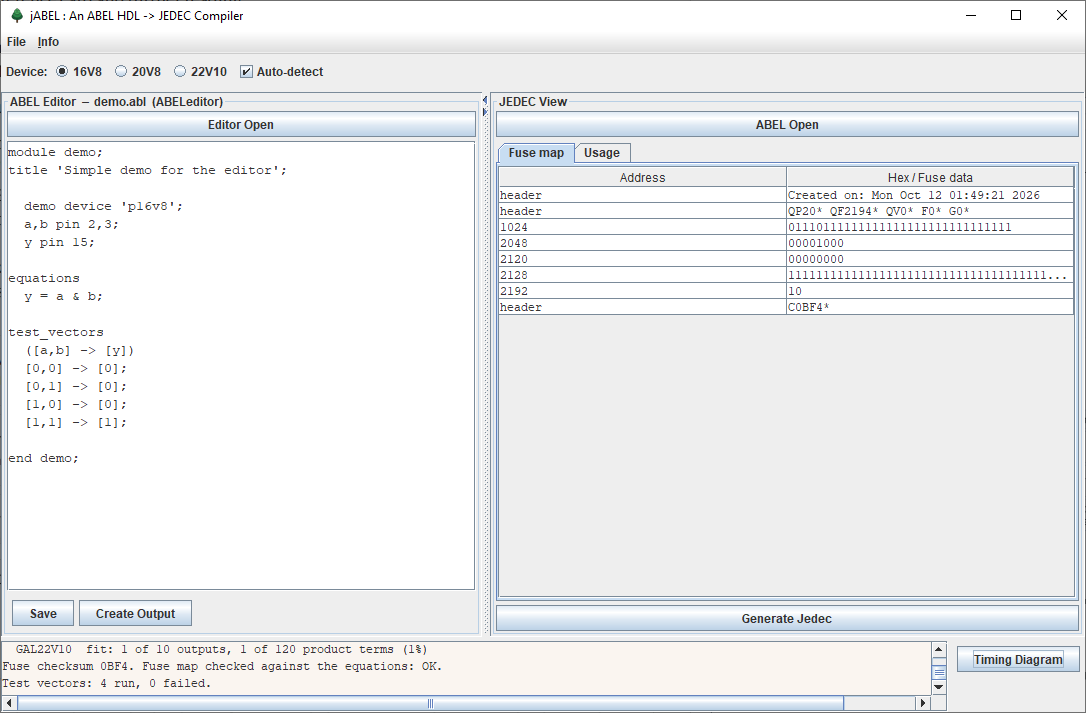
The three lines at the bottom are the important ones. Fuse checksum 0BF4 is the checksum stored in
the file (the C0BF4* row) that your programmer will display. Fuse map checked against the
equations: OK means jABEL has built a model of a GAL16V8 from nothing but the fuses it just wrote,
driven it with every possible input, and compared it with your equations. Test vectors: 4 run, 0 failed
means your four expectations held on that simulated chip too.
ERSTES.ABL,
the first example ("erstes" is German for "first") that came with EZ-ABEL 4.32. jABEL's JEDEC file matches the one EZ-ABEL wrote in
1998 fuse for fuse — same fuse map, same C0BF4 checksum.
Seeing It on a "Logic Analyser"
Press Timing Diagram and the test vectors are replayed as waveforms, drawn white-on-black in the style of a bench logic analyser. Inputs are what you asked for; outputs are what the simulated chip actually produced. If an output disagrees with your vector, it turns red.
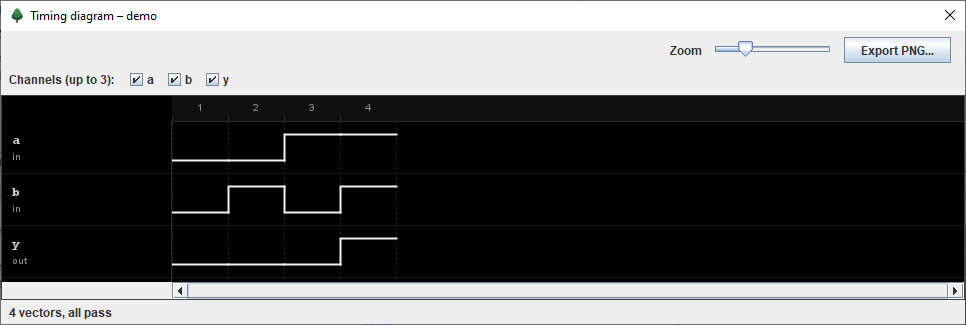
Try breaking it on purpose: change the last vector to expect [0], press Create Output again, and
watch the report and the waveform both call it out. A tool that tells you when you are wrong is worth more than
one that always says "done".
Three Folders, Three Buttons
jABEL keeps your work in three folders beside the program, so finished files never get mixed up with experiments:
ABELfiles— the worked examples (ABEL Open). Read-only in spirit; saving one puts a copy in your working folder.ABELeditor— your working folder (Editor Open, Save, Create Output). Trial JEDEC files land next to their source.JEDECfiles— final files for the programmer (Generate Jedec). jABEL refuses to put a file here if the design has errors, and asks first if a test vector failed.
A Second Design: Something With a Clock
The getting-started guide moves on to a 2-bit counter with enable, synchronous clear and tristate outputs —
which introduces registers, sets and WHEN:
  Q = [q1, q0];               " a set: two pins treated as a number

equations
  Q.clk = clk;                " registers clocked by pin 1
  Q.oe  = !oe;                " outputs on while pin 11 is low

  when clr then Q := 0;
  else when en then Q := Q.fb + 1;
  else Q := Q.fb;

  carry = q1 & q0 & en;
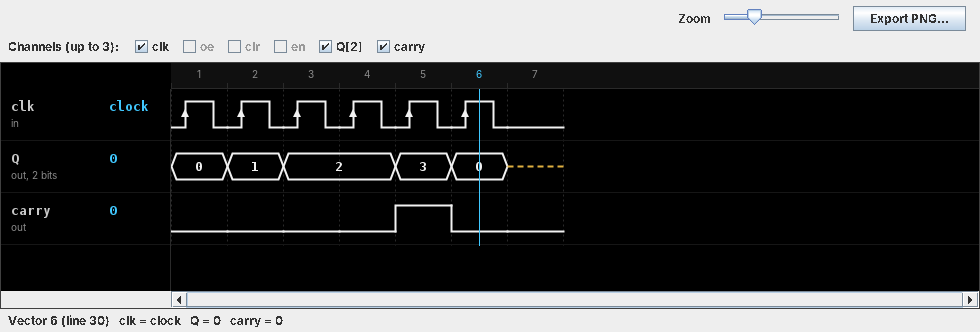
:= means "on the next clock edge", and .c. in a test vector means "pulse the
clock". The timing view draws the clock with edge arrows and shows a set as a bus in hex — with a cursor you can
drag across to read every value:
How Full Is the Chip?
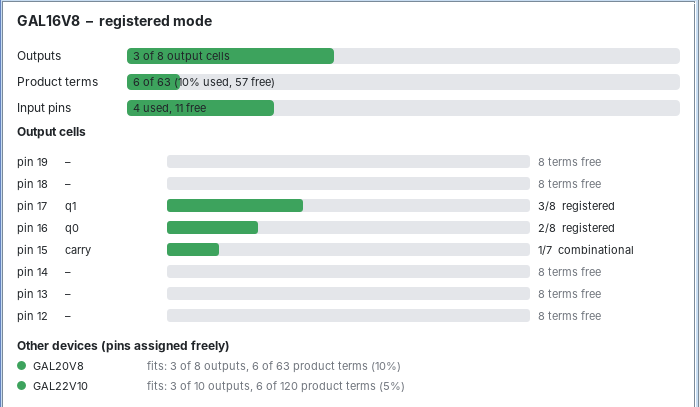
GALs are small, and the question you always end up asking is "will it still fit?". The Usage tab answers it: output cells, product terms and input pins used and free, a bar per output pin showing how many of its terms you've spent, and whether the same design would also fit the other two devices.
Why You Can Trust the Fuses
A JEDEC file is several thousand ones and zeros; nobody checks it by eye, and the programmer only confirms that the chip holds what the file says. So jABEL checks itself, every time, and was checked against independent tools before release:
- Self-simulation: every compile rebuilds the chip from its own fuse map and compares it with the equations — exhaustively for up to 14 inputs per equation — then runs your test vectors clock by clock.
- Against EZ-ABEL: identical output, fuse for fuse, on the reference design above.
- Against Galette: seven hand-written designs covering every mode of all three chips, plus 900 randomly generated ones, all produce identical fuse placement.
- Correct checksums: the 16-bit fuse checksum and the STX/ETX transmission checksum are both
computed the way programmers expect.
--check file.jedwill verify any JEDEC file you already have.
Help Built In
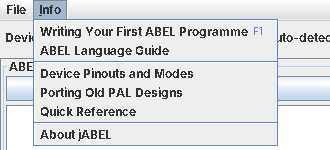
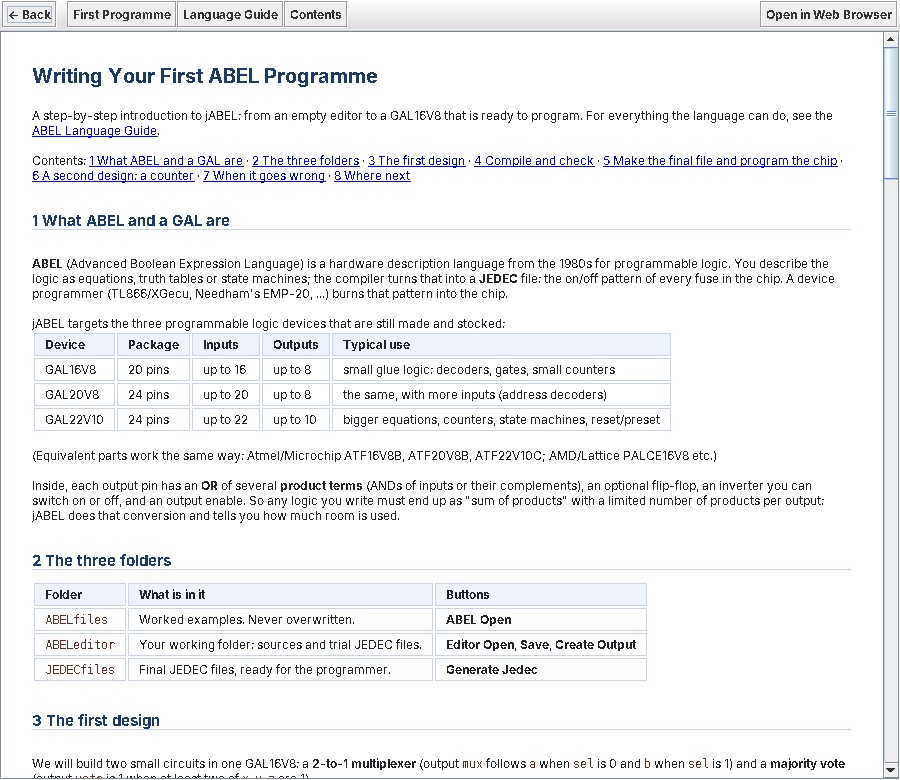
The Info menu carries two guides, written specifically for these three devices rather than copied from manuals that covered dozens of long-obsolete PALs. Writing Your First ABEL Programme (F1) takes you from an empty editor to a programmed chip; the ABEL Language Guide covers the whole language as jABEL accepts it — sets and arithmetic, dot extensions, registers, state machines, truth tables, the pinouts and modes of each device, and how to port old PAL designs (including turning JK, T and SR flip-flops into D equations).
Every complete example in the guides — a decoder, a 22V10 shift register with reset and preset, a traffic-light
state machine, a priority encoder, a T flip-flop counter and more — ships in ABELfiles and passes
its own test vectors.
What's in the Package
app/abel-jedec.jarand launchers for Windows (.bat) and Linux/macOS (.sh). Needs only Java 11 or newer — no installer, nothing written to the registry.- The three working folders, with 18 worked examples and their verified JEDEC files.
- The two guides (also readable in any web browser), a PDF manual and a change log.
- A command line for batch work and makefiles:
java -jar app/abel-jedec.jar -i design.abl -o design.jed -v. - Full source, with a regression test suite and the Galette cross-check scripts.
Q and q are the same signal, and jABEL tells you if that
causes a clash rather than silently merging them.
Wrapping It Up
jABEL gives these still-useful little chips a modern, free, one-window workflow: type ABEL, press Create Output, read an honest report, look at the waveforms, and send a checked JEDEC file to the programmer. If you have a drawer of GALs, an old PAL design to bring back to life, or just want to teach yourself programmable logic on something you can hold in your hand, it should make that pleasant again.
jABEL is available on request — use the form below and tell me a little about what you'd like to build.